Time Stop: The Simplest Idea That Took the Longest to Get Right
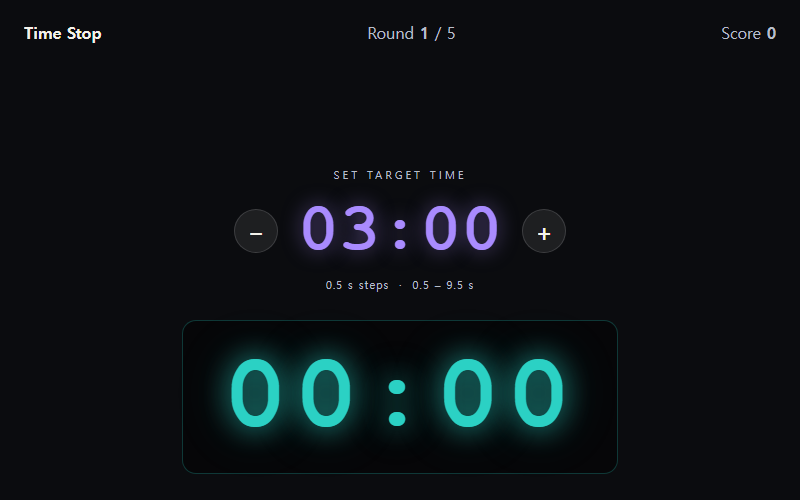
Time Stop is one button and one idea: a timer runs, you set a target, you press STOP as close to that target as you can. I built it in an afternoon and spent the next two weeks trying to make it feel good. There's something uniquely difficult about designing a game this minimal — with no complexity to hide behind, every flaw in the feel of the mechanics is fully exposed. Here's what I learned from those two weeks.
The Problem With Measuring Milliseconds in a Browser
When I first built the prototype, I used JavaScript's Date.now() for timing and noticed the results felt inconsistent. Players would press the button at what looked like the right moment and land 80 or 100 milliseconds off — more than I expected. The issue was a combination of things: browser rendering jitter, the event loop not being perfectly deterministic, and the inherent latency between a physical button press and the code registering it. I switched to performance.now() which gives sub-millisecond resolution and is more stable across frames. I also started recording the timestamp at the very top of the keydown handler before any other logic ran. Those two changes cut the average error from player intention by roughly 30 milliseconds. That might sound small, but when your entire game is about precision down to single-digit milliseconds, 30 milliseconds is the difference between a great score and a frustrating one.
Designing the Scoring Curve to Feel Fair
My first scoring system was linear: the closer to the target, the more points. Zero difference was perfect. This worked logically but felt bad emotionally. Players landing 20 milliseconds off felt the same as players landing 80 milliseconds off — they both "missed." I redesigned the curve using a squared falloff, heavily weighted around a tight perfect window. Landing within 10 milliseconds gave full score. Landing within 50 milliseconds gave about 80% of full score. Outside 200 milliseconds was near zero. This made the jump from good to perfect feel satisfying and achievable, while still clearly distinguishing great attempts from mediocre ones. I also added visual tiers with names — "Perfect," "Great," "Good," "Off" — because labeling a performance helps players understand what they're aiming for. The label does more emotional work than the number alone.
Making Stillness Interesting Across Multiple Rounds
The trickiest part of Time Stop is that there's nothing to look at while you wait. You watch numbers tick up. That's the entire game. To create variety across rounds I started randomizing the target time between 2 and 8 seconds, which changes the psychological challenge significantly. A 2-second target is pure reflex — you barely have time to think. An 8-second target is a meditation exercise, almost like counting breath. Those two experiences feel completely different even though the mechanic is identical. I also added a round history strip showing your last five attempts as colored dots — green for good, red for off — because I found players would try harder when they could see a streak of greens forming. Giving players something to protect, even something as minimal as a visual streak, is a surprisingly powerful motivator in a game with no other progression system.
Browse All Games